


Locationscout - Photo Spots
3.633.00 Reviews
App Specs
- Version
- 3.4.0
- Updated On
- License
- Free
- Downloads
- 50,000+
- Developer
- Locationscout
- Categories
- Travel & Local
- Platform
- Android
Screenshots

 Analysis by AppCompare
I first tried Locationscout - Photo Spots with a familiar travel question: when I arrive somewhere new, how do I find a worthwhile view without spending half the day scrolling through old posts? The app is built for that kind of planning, bringing photography locations together with travel ideas. Its appeal is strongest when I treat it as a starting point for a day out, not as a promise that every pin will lead to a perfect shot.
The first-week appeal: turning a map into a plan
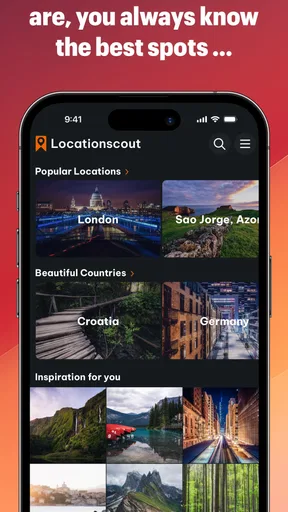
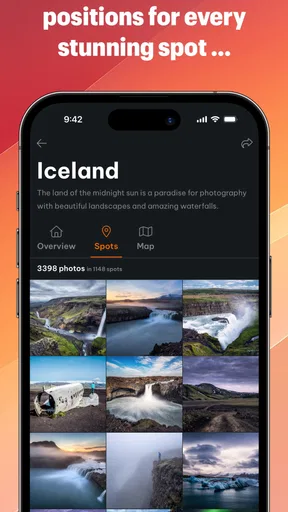
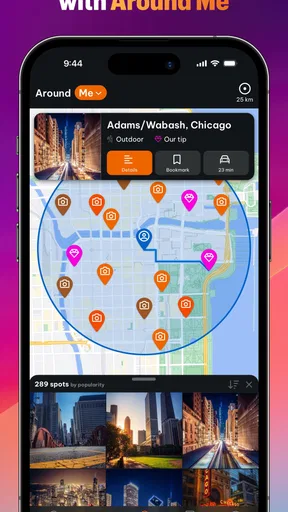
In the first few days, the map is the feature I reach for most. I can look around a destination, notice photo spots that might otherwise be missed, and save places that catch my eye. That makes browsing feel more purposeful than collecting screenshots from several social feeds: the locations sit in one place, ready to shape a possible route.
The useful habit is to save selectively. I would bookmark a handful of spots for each area, then group my thinking by the kind of outing I actually want: an early walk, a relaxed afternoon, or a route with several nearby stops. A long list of pins can be exciting at first, but it is not automatically a good itinerary. Keeping only the locations I could realistically reach makes the app easier to use once I am on the move.
Location discovery also helps before a trip. I can browse a destination while deciding what deserves time, then use the saved places as prompts when making a broader travel plan. That is different from choosing a hotel or working out transport: the app helps me answer the more visual question of what I might want to see and photograph.
What makes it more than a list of viewpoints
The community element gives the map its character. Other users can contribute locations, photos, and descriptions, so the appeal is not limited to famous landmarks. A contribution may point out a different perspective or explain why a place is interesting to photograph. I like that practical, visual context because a name on a map rarely tells me whether a stop fits my interests.
Tips about angles and light can help me think ahead, but I would treat them as guidance rather than a guarantee. Conditions change with weather, season, access, and the time I arrive. One of the better ways to use community notes is to turn them into questions: Is this view still worth a detour if the light is different? Is the location close enough to combine with another stop? That mindset makes the app more useful than trying to reproduce somebody else’s exact image.
There is also a social, motivational side to the photography challenges described in the app. They can give me a reason to practise while travelling, especially if I am prone to taking the same kinds of pictures on every trip. I would use a challenge as a creative nudge, not as a measure of whether a day out was successful. The trip should still work if I decide to put the camera away.
Worth Reading Before You Choose

Flipboard Shows What News Apps Must Do Beyond the Feed

Switching to Android Auto Means Rethinking Your Driving Routine

Google Calendar Makes a Crowded Week Easier to Manage

Ludo King Makes the Most of the Minutes Between Plans

Baby Panda World Brings Quick Play to Modern Phones, but Its Game Library Feels Busy

ESPN’s Live Game View Makes Following Close Games Easier
Making the map useful over time
I use the map differently once the first burst of browsing wears off: I keep a short, trip-specific shortlist and revisit it when plans change, rather than trying to save every appealing view. That makes the locations easier to act on and leaves room for spontaneous stops. It also sets up the next question: whether this routine stays helpful across different kinds of trips.
Month-to-month value depends on how you travel
For a frequent traveller or someone who regularly explores nearby places, a growing set of saved locations can stay useful between trips. The app is a Travel & Local product from Locationscout, and its central value is tied to discovering places through a photography-minded lens. If I travel only occasionally, I may use it intensely while preparing and then leave it untouched for weeks. That is not necessarily a flaw; it simply means the value comes in bursts rather than from a daily routine.
It also sits in a different lane from ordinary map apps and social platforms. A general map is better for navigation and practical stops, while social feeds are often better for seeing what is currently popular. Locationscout is more focused on finding photo-worthy places and collecting ideas around them. I would still use a regular navigation app to handle directions and timing, and I would check current local information before making a special trip. The photo map can help choose a destination, but it should not be the only tool guiding the day.
The small maintenance that keeps saved ideas usable
A saved spot is useful only if I can remember why I saved it. I would add a little discipline to the process: keep a short list for the trip I am planning, remove places that no longer fit, and avoid treating every attractive pin as a commitment. This is especially helpful when a destination has many possible viewpoints. The goal is not to build the biggest collection; it is to make a list that still helps when I have limited daylight or energy.
For a realistic weekend, imagine I have a free Saturday in a city I do not know well. I can browse the map before leaving, save a few locations that are close enough to combine, and choose one as the main reason for the outing. If a spot turns out to be crowded or the light is poor, I can move on to another saved idea rather than trying to force the original plan. That flexible approach is more reliable than scheduling a day around one perfect picture.
Before setting off for a remote or unfamiliar place, I would also check ordinary travel details separately: the route, opening or access information where relevant, and whether the location suits the people coming with me. A photo contribution can inspire a visit, but it is not a substitute for current local guidance. This is a practical boundary worth keeping in mind whenever a map pin looks more certain than the real world.
Where friction and fatigue can set in
The main trade-off is that community content is only as helpful as its relevance to my plans. A popular location may be well represented, while a quieter area may give me fewer ideas to compare. Descriptions and images can also reflect another visitor’s priorities, so I still need to decide whether a spot is right for my pace, interests, and travel companions. If I want a complete guide to transport, restaurants, bookings, and opening hours, this is not the app I would rely on for all of that.
There is a second kind of fatigue: collecting inspiration can become its own activity. Browsing one more location or challenge may feel productive, even when I already have enough ideas for the trip. I find it helps to stop searching once I have a workable shortlist. That keeps the app in a supporting role and leaves more time for the place itself.
The app is free to download, with optional in-app purchases listed from $11.99 to $69.99 per item. I would begin with the free experience and decide whether I use it often enough before spending anything. Its average rating is 3.5 from around 424 ratings, a mixed enough signal that I would approach it with realistic expectations rather than assuming every person will find the same value. It has over 50,000 installs, is rated Teen, and its current version is 3.2.1. It was released on August 23, 2020, and works on Android 6.0 and up.
Who should keep it, and who can skip it
I think it suits photographers who enjoy scouting, travellers who like building flexible days around places to see, and locals who want fresh ideas for exploring their own area. It is also a good fit for someone who wants visual inspiration before choosing where to go, without expecting a standard city guide to do the same job. The strongest reason to keep it is recurring curiosity: if I often wonder what is worth photographing nearby, a saved map can become a handy reference.
I would skip it if my main need is turn-by-turn navigation, a comprehensive destination guide, or a tightly scheduled itinerary with practical details in one place. I would also be less likely to keep it if I rarely take photography-focused trips and already find enough places through my usual maps and recommendations. In those cases, the app may be more fun to browse during the first week than useful month after month.
For a first-time user, I would try one small workflow before judging it: choose a destination, save a few realistic options, and see whether those ideas improve an actual outing. That answers the questions that matter most: whether the locations suit my taste, whether the community notes help me decide, and whether I will return to the map after the novelty wears off. No elaborate collection is needed to find out.
My long-term verdict
When I first stumbled across Locationscout - Photo Spots, I was skeptical. Could an app really show me places I haven't already seen plastered all over social media? But let me tell you, it truly does. Once you open the app, you're greeted with a sleek and intuitive interface. It's not cluttered, making it super easy to navigate even if you're not the most tech-savvy person.
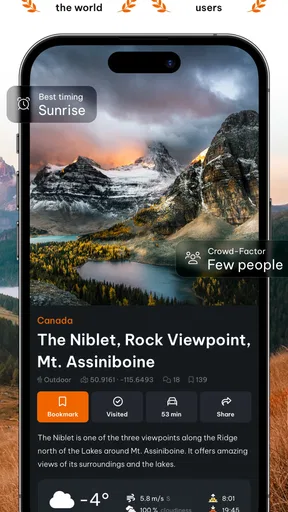
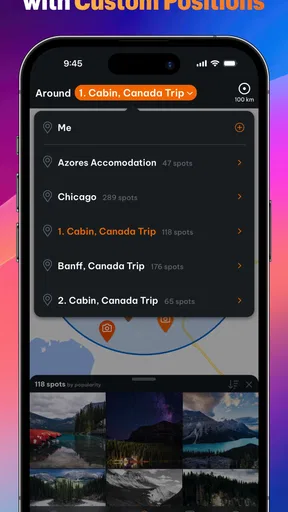
The app's main feature is its map. You can choose a location or let it detect your current spot. Then, like magic, you're presented with a plethora of photo spots, each marked on the map. Tapping on any of these spots gives you a treasure trove of information, from user-uploaded photos to tips on the best time of day to visit. It's like having insider knowledge at your fingertips!
Community-Driven Content
One of the things I absolutely love about this app is its community-driven approach. Users can add their own photo spots, complete with pictures and detailed descriptions. This means you're not just getting generic, touristy spots but also those secret locations only locals know about.
And it’s not just spots. You can find tips for capturing the perfect shot, whether it’s the best angle or the most flattering light. I’ve learned so much just from browsing through other users’ contributions. It’s like being part of a global community of photographers, all sharing the love for capturing the world’s beauty.
Features That Stand Out
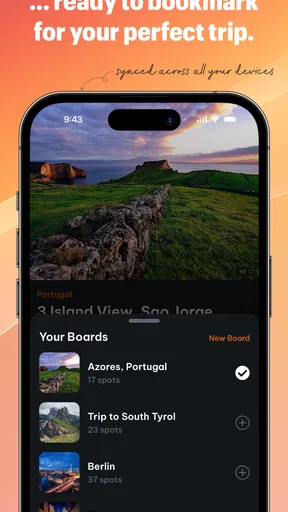
Beyond the map, there are some standout features that make this app a must-have. First up, the "Favorites" feature. You can bookmark locations you find interesting, creating your personalized travel photography itinerary. No more scrolling through endless lists or getting lost in a sea of options.
Another impressive feature is the "Challenges" section. This part of the app offers photography challenges that you can participate in. It’s a fun way to test your skills and see how you stack up against other photographers. Plus, it’s a great excuse to get out there and start shooting!
Practical Use and Performance
In terms of performance, the app runs smoothly. I didn’t experience any lag, and the map loaded quickly even when I was in a less-than-stellar Wi-Fi zone. Battery consumption is also minimal, which is a huge plus when you’re out and about all day.
The app is available on both Android and iOS, making it accessible to pretty much everyone. And if you’re worried about data usage, don’t be. You can download maps for offline use, which is perfect for those remote locations where signal is a myth.
My lasting impression is positive, with a practical caveat: the map and community are most valuable when I use them to spark a plan, then make room for improvisation. I would not keep every suggestion or expect every visit to match a contributed photo. Used that way, the app can earn a place in my travel toolkit without becoming another source of chores.
If you’re an avid traveler or just someone who loves to capture the world through a lens, Locationscout - Photo Spots is a game-changer. It’s not just an app; it’s a community, a guide, and a source of endless inspiration. Whether you’re a seasoned pro or a budding amateur, this app will enhance your photography experience.
So, next time you find yourself in a new place, wondering where to get that perfect shot, remember you’ve got a trusty companion in Locationscout - Photo Spots. Happy shooting!
Pros
- User-friendly interface for easy navigation.
- Extensive database of global photo spots.
- Offline access to saved locations.
- Community-driven content with real reviews.
- Customizable lists for favorite spots.
Cons
- Limited editing tools for photo enhancements.
- Requires internet for location updates.
- Some areas lack detailed spot info.
- Occasional app crashes reported.
- Subscription required for premium features.
FAQs for Locationscout - Photo Spots
What is Locationscout - Photo Spots and how does it work?
Locationscout - Photo Spots is a travel app designed for photographers and travelers looking for the best photo locations worldwide. It offers a curated database of stunning spots, complete with images, tips, and user reviews. The app uses GPS to guide you to each location, ensuring you never miss a perfect shot.
Is Locationscout - Photo Spots available for both Android and iOS devices?
Yes, Locationscout - Photo Spots is available for download on both Android and iOS platforms. You can find it on the Google Play Store and the Apple App Store, making it accessible to a wide range of users. Ensure your device meets the app's system requirements for optimal performance.
Does the app require an internet connection to function?
While an internet connection enhances the app's functionality by providing real-time updates and location information, Locationscout - Photo Spots also offers offline mode. You can download photo spots and maps in advance, allowing you to access them without an internet connection, which is especially useful in remote areas.
Are there any costs associated with using Locationscout - Photo Spots?
Locationscout - Photo Spots offers a free version with basic features. However, to access premium features like exclusive photo spots and advanced navigation tools, you may need to purchase a subscription. Check the app store for the latest pricing details and in-app purchase options.
How does Locationscout - Photo Spots ensure the quality of its photo locations?
The app maintains high-quality standards by relying on community contributions and expert reviews. Users can submit new locations, which are then verified by a team of photographers. This ensures the spots are not only visually stunning but also accessible and safe for visitors.


